Hi,
I just start using my BlueDriver (recommended by Scotty) and it seems like I have a fuel trim issue (picture below):

The picture was taken when idling.
I am not very mechanically inclined so can you please help me on where I should start? Hummer H2 2008 (6.2L).
Thank you!

You're not giving us much to work with. By that screenshot it looks like you're running rich, but we also see that the computer is starting to add fuel back (at idle).
You combine LTFT and STFT to see the actual fuel trim.
For example, on Bank 1 you have a LTFT of -5.5%. A STFT of +3.9%. The computer is subtracting 1.6% (-1.6%) on Bank 1 at the time of that screenshot.
Bank 2 you have a LTFT of -10.2%. A STFT of +3.9%. The computer is subtracting 6.3% (-6.3%) on Bank 2 at the time of that screenshot.
It looks like you have 4 codes stored in the ecm but only 2 are visible in that screenshot. Both are Cat efficiency codes but you never address those until you resolve any other codes and fuel trim issues. So look at what those other 2 codes are.
You'll need to look at more data and at different RPMs.
You'll want to look at the data at idle (engine warmed up) and also at above 2,000 rpms (while driving) to see what's going on.
The data you'll want to record

So take your MAF sensor data for example. The rule of thumb is that MAF g/s should be close to engine displacement at idle. You have a 6.2L engine so the MAF at idle should read around 6g/s.
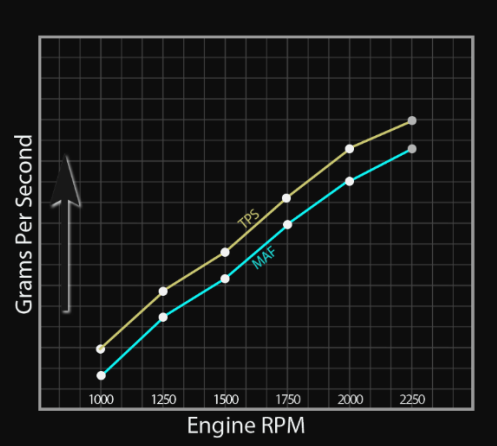
What should it read at 2000 rpms? Who knows? But a way to see if it's keeping up is to graph your TPS and MAF together.
They should mirror each other as you press on the accelerator pedal as the throttle plate opens.